
Dev From Scratch: 6/n
Effective AI-assisted development using only local resources

Chapter 6 of “development from scratch”, where we build a competitive and highly effective AI-assisted coding environment using only local models and resources.
In this chapter we combine inference, codebase indexing, and optimizations to fit both, alongside the host OS, on a 5090 for a fully local baseline SWE environment.
Link to previous chapter | Link to next chapter | Link to companion GitHub repo.
Getting Started
# Pull down the latest version of the companion repo:
git fetch --all && git pull

# Pull down the inference container (may take 15-30+ minutes):
docker pull yevai/local-inference-qwen3:sm120-cu131-v1
If you set up WSL correctly, you should see the below when you run “lscpu -e”:
CPU NODE SOCKET CORE L1d:L1i:L2:L3 ONLINE
  0    0      0    0 0:0:0:0          yes
  1    0      0    0 0:0:0:0          yes
...
 27    0      0   13 13:13:13:0       yes
If you see less than 27 vCPUs in WSL, adjust the “cpuset“ in “docker-compose.yaml”.
Next up, make sure that whatever you’re running on the host is consuming less than 2.5GB VRAM by running nvitop. If you don’t have ten billion tabs of 4K videos open because it’s 5am and you ended up in the weird part of YouTube, you should be good.
# Run this in root (requires going through previous chapters):
docker compose --profile dev --env-file codebase-indexing/.env up
Roo Code profile settings for this configuration:
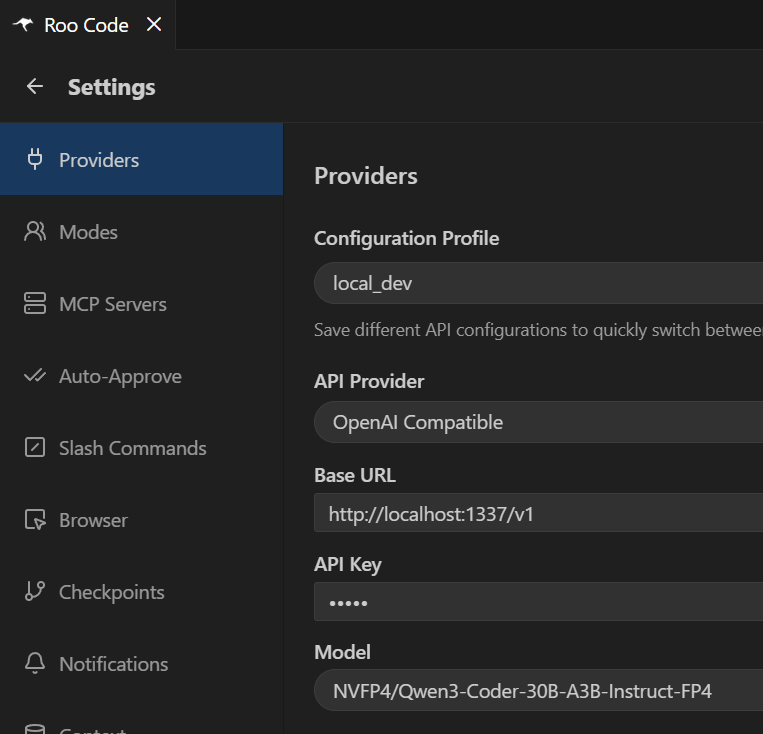
You’re now able to use Roo Code just like in this video:
That’s it! Runs fast, right? We’ll be taking advantage of that. In the next Chapter, we’ll:
Set up observability for our LM, embedder, and re-ranker.
Run benchmarks to evaluate the performance of Roo Code.
Create Roo Code settings for good quality with these models.
You can skip the below info if you’d prefer to wait for the next hands-on chapter.
Docker: inference-model
The yevai/local-inference-qwen3 image adds single-GPU SM120 optimizations and patches stability and performance bugs in the new version of the vLLM engine.

Now let’s go over why we did (most) of what we did in the new docker-compose.yaml!
runtime: nvidia tells docker to use the NVIDIA Container Runtime instead of runc. This allows injection of the proprietary driver files and CUDA libraries from the host.
CPU Settings
cpuset: “0-15” pins the inference container to CCD1 on the 9950X. CCD stands for “Core Complex Die”, a single physical chiplet on the CPU die. This gives vLLM a private 32MB cache, avoids Noisy Neighbor problems, and ensures we don’t grind CPU pre-processing to a halt by sending traffic across the (relatively) slow Infinity Fabric.
If you want to see inference grind to a halt, try removing the cpuset attributes from the first three containers - they will thrash each other and you’ll get ~20-30TPS.
pid: host lets the container use the host’s Process ID namespace. This removes PID translation overhead and lets preprocessing run with proper CPU-GPU signal handling.
ipc: host lets PyTorch access the host’s IPC namespace (shared memory). We want this because PyTorch relies on /dev/shm to move data between CPU worker threads.
memlock: -1 lets NVIDIA drivers pin memory pages to RAM, which lets it use Direct Memory Access because it knows the memory is (1) reserved and (2) not in a page file.
stack: 67108864 gives us a 64MB stack instead of the default 2-8MB, without which Python itself might get lost in the sauce of recursive matrix operations and fail silently.
Environment Variables
TORCH_CUDA_ARCH_LIST=12.0 tells PyTorch to compile JIT kernels for Blackwell.
NCCL_P2P_DISABLE=1 explicitly disables the NCCL bridge since we’re using 1 GPU.
VLLM_USE_V1=1 tells vLLM to use all the fancy stuff we fixed for SM120/Blackwell.
VLLM_NO_USAGE_STATS=1 disables (internal) observability for a performance boost.
VLLM_FLASH_ATTN_VERSION=3 could be its own article. At a high level, it enables:
WGMMA, which lets thread groups collaborate on matrix math much faster.
TMA, which is a specialized asynchronous hardware unit on Hopper+ GPUs.
A bunch of FP4/8 specialized goodies that we want but won’t go into here.
You might be thinking “But Yevgen, we’re using FlashInfer anyways?” Not quite :)
[OPM/MKL]_NUM_THREADS=16 explicitly uses the same number of threads we cpuset.
CUDA_DEVICE_MAX_CONNECTIONS=1 prevents CUDA from creating multiple streams at the hardware level. All software queues are streamed into a single hardware command queue, which prevents thrashing, massive serialization jitter, and other bad things.
TORCH_CUDNN_V8_API_ENABLED=1 enables the cuDNN v8 Graph API, which enables Blackwell-native Kernel Fusion mechanisms. A sequence like Conv → Bias → ReLU, which is usually 3 separate launches and memory round-trips, is fused into one GPU operation. This massively helps throughput by keeping data resident in the L2 cache.
vLLM Launch Args
—quantization modelopt_fp4 tells vLLM to use NVIDIA ModelOpt, TensorRT-LLMs quantization engine. It’s the only reason this model fits on a 5090 with room to spare. Older 4-bit formats required software unpacking. This feeds directly into the Blackwell FP4 Tensor Cores, effectively doubling memory bandwidth and compute throughput.
--enable-prefix-caching should be a default for all LM code assist tools.
—max-num-batched-tokens “2048” is there because we also had to fit the re-ranker and embedding model into VRAM. The CUDA Graph config offsets the performance hit from this while conserving precious VRAM, which we don’t have that much of:
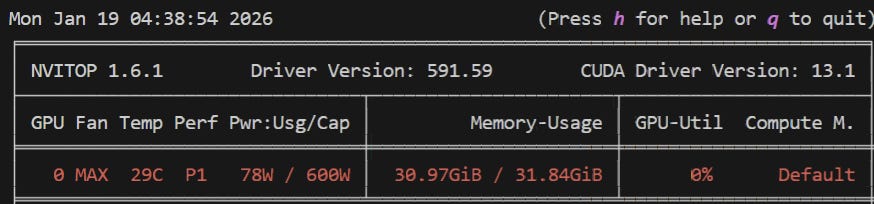
Thanks to that, we can use --max_model_len “131072”: a 131k context window. Our version of Qwen3 has 262k context natively but we’d have to turn off the embedding and re-ranker to afford VRAM for a 262k KV Cache - which you can! That’d put our very own local model context window up there with a good chunk of SoTA models.
--kv-cache-dtype fp8_e4m3 is the other piece of magic that makes this possible by quantizing our KV Cache. A 131k FP16 cache would nuke VRAM. In our very specific case the accuracy loss from quantization is <0.05%. 3 mantissa bits distinguish subtle attention signals from noise by trading dynamic range to buy back inference accuracy.
—max-num-seqs “1” is not great for agent swarms. In fact, it sucks. But it’s what we can afford in VRAM poverty. Combined with —gpu-memory-utilization “0.75”, this gives us a 1.07x token buffer which is enough for PyTorch’s memory shuffling.
These things are what let LM code assist tools like Roo Code properly use the model:
—enable-auto-tool-choice—tool-call-parser qwen3_coder
And that’s it! With a relatively simple setup, we’re off to the races with SoTA codebase indexing capabilities and a capable primary model boasting a 131k context window. I might try to find a GGUF-able embedding and re-ranker and try that out to see if we can flex a full setup with 262k context even though we will almost never need it.