
Dev From Scratch: 9/n
Effective AI-assisted development using only local resources

As of 04/25/2026, Qwen 3.6 is the best 20B+ param LM code harness model runnable on a 5090 by such a wide margin that we will skip the rest. Courtesy of yours truly, this gets you aggregate ~750 (180+ single request) TPS and a 720K* token context window.
* AGGREGATE. You can extend single windows past 262K native via YaRN but don’t. If this is your first time not using APIs, hi! 750 TPS is about 500-600 words per second.
Link to previous chapter | Link to next chapter (WIP) | Link to companion GitHub repo.
Your env/hardware should reflect what’s been set up in the series, especially Chapter 5.
Definition: “such a wide margin”

If you told someone in Q4 2025 that a model with the below specs would be open sourced in the next 6 months, they’d laugh at you. If you told them that it would also be under 300B parameters they’d cry for you. More on time machines in later sections.
Qwen 3.6 27B dense TL;DR:
Destroys the Qwen 3.5 397B-A17B, which was no slouch, on most benchmarks.
262k native context with a KV cache memory footprint smaller than your car keys.
SWE-bench Pro: 53.5 vs Google’s recent “SoTA” Gemma 4’s 35.7
SWE-bench Verified: 77.2 vs Google’s recent “SoTA” Gemma 4’s 52.0
Terminal-Bench 2.0: 59.3 vs Google’s recent “SoTA” Gemma 4’s 42.9
Claw-Eval (lmao) Avg: 72.4 vs Google’s recent “SoTA” Gemma 4’s 48.5
And it’s 12% smaller than Gemma 4 31B, which does matter when you’re VRAM poor.
35B-A3B TL;DR: is a 3B active sparse model that beats Gemma 4 31B dense on coding benchmarks while also being around 6-9x faster for inference on a 5090. The 3.6 27B dense absolutely destroys the Gemma 4 31B dense, which is a fairer comparison.
If you’re on a 5090 and have other models in /hub/, rm -rf that because the 35-A3B beats Opus 4.7 …is what you’d read on LinkedIn 🤡. Okay it does, but A FLAMINGO? Nah. It unironically trades blows with Sonnet 4.5 though. Lots of threads like this:
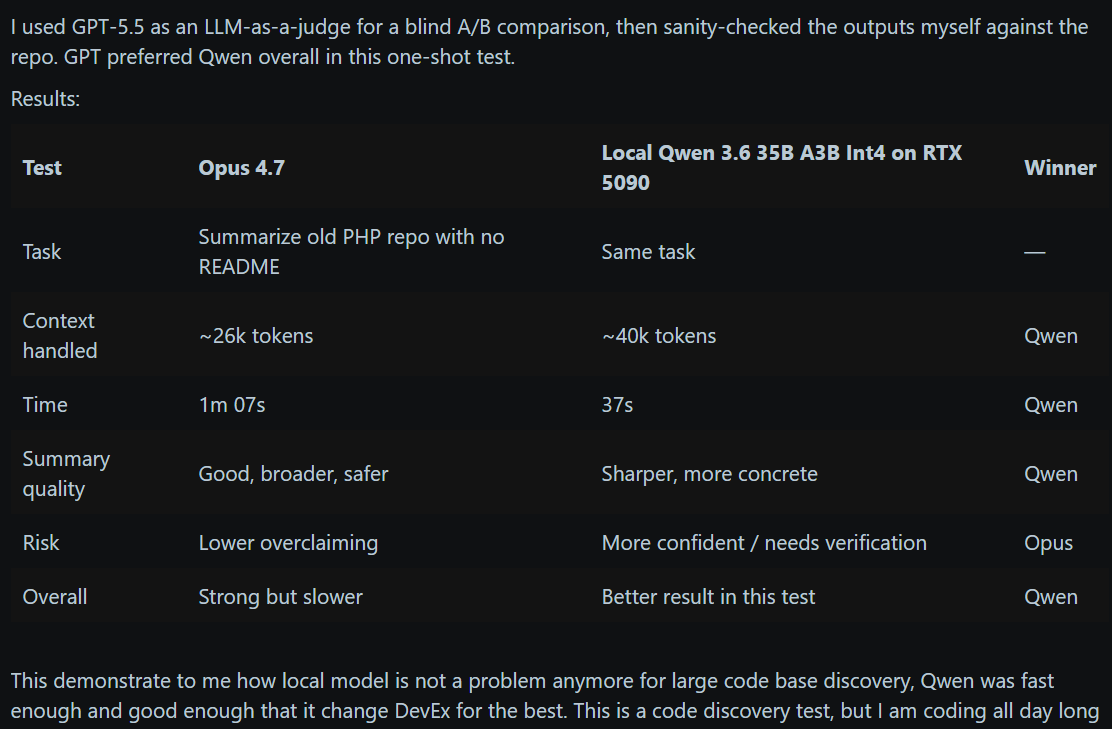
And we’re about a spin up a cracked version of it on a cracked vLLM image. Strap in.
Prerequisites
Install 596.36+ Nvidia drivers or higher on the host and CUDA 13.2+ in WSL. Run:
# Before anything, kick this off in a separate terminal window because it takes a while:
docker pull yevai/local-inference-qwen36:sm120-cu132-v4
# - Bleeding edge(lord) private fork of torch@2.13.0.dev20260502+cu132 with extra goodies
# - My startup's vllm@0.0.0+sm120.custom.cu132 private fork with a few goodies left out
# - I didn't do anything for this except build from main: llmcompressor@0.10.1.dev127+g76b28ce7
# - flashinfer@0.6.10rc1 with a few bug fixes / perf improvements. Their code is getting good.

# Also kick these off in separate terminal window(s):
hf download sakamakismile/Huihui-Qwen3.6-35B-A3B-Claude-4.7-Opus-abliterated-NVFP4
hf download sakamakismile/Qwen3.6-27B-Text-NVFP4-MTP
# * PREVIOUS CHAPTERS! hf is aliased to huggingface-cli

# Pull down the latest version of the companion repo and check that all is well:
cd docs/chapter-09
chmod +x wsl-cuda-upgrade.sh
./wsl-cuda-upgrade.sh #Idempotent #FYP

# The explanation to this one is that I love you and you're awesome.
mkdir -p "${HOME}/.cache/vllm"
Configurations
Swarm vs hive use cases have been beaten to death to such an extent that even some of the LinkedIn ArmchairI Experts™ are starting to get it right so we’ll let that one sit.
If the 35B-A3B can’t cut it, swap in the 27B. I decided to post this before I unf*cked my DFlash speculative decoder for the 27B so it’s quality but much slower. My speculative decoder game is rusty. The last time I was good at autoregressive drafters was Sully AI and that got them 1,000+ TPS per user on a 400B model for ~30x cheaper than APIs. Last time I was good at block/parallel drafters was never so it’s a learning experience.

When these start up, try “./docs/chapter-09/fluffer.sh” to get them in the mood. If you don’t have the .env file, see “Getting Started” / setup.sh in Chapter 5. If you noticed vLLM spinning up with, say, ~300K more context capacity than you’d expect a model of this size and KV cache arch to have on 32GB of VRAM, no that is not a coincidence.
# DX QOL utils
cd docs/chapter-09
chmod +x run.sh

# See available options
./run.sh

# Tail inference container logs
./run.sh logs

# Get container status as JSON
./run.sh status

# Open interactive GPU perf monitor
./run.sh perf

# Stop + remove all shared containers
./run.sh purge
Qwen 3.6 A3B Swarm
700+ TPS across five 131k windows for you! Swarms are a crowd favorite for codebase modernization, package upgrades, wide-sweep refactors, and most other daily tasks.
cd docs/chapter-09 && ./run.sh start:swarm-only
# Tail logs
cd docs/chapter-09 && ./run.sh logs
# Inference AND indexing. The only way you'll have the VRAM for this is if you implemented
# the previous chapter and your only video output is from the motherboard's thunderbolt.
cd docs/chapter-09 && ./run.sh start:swarm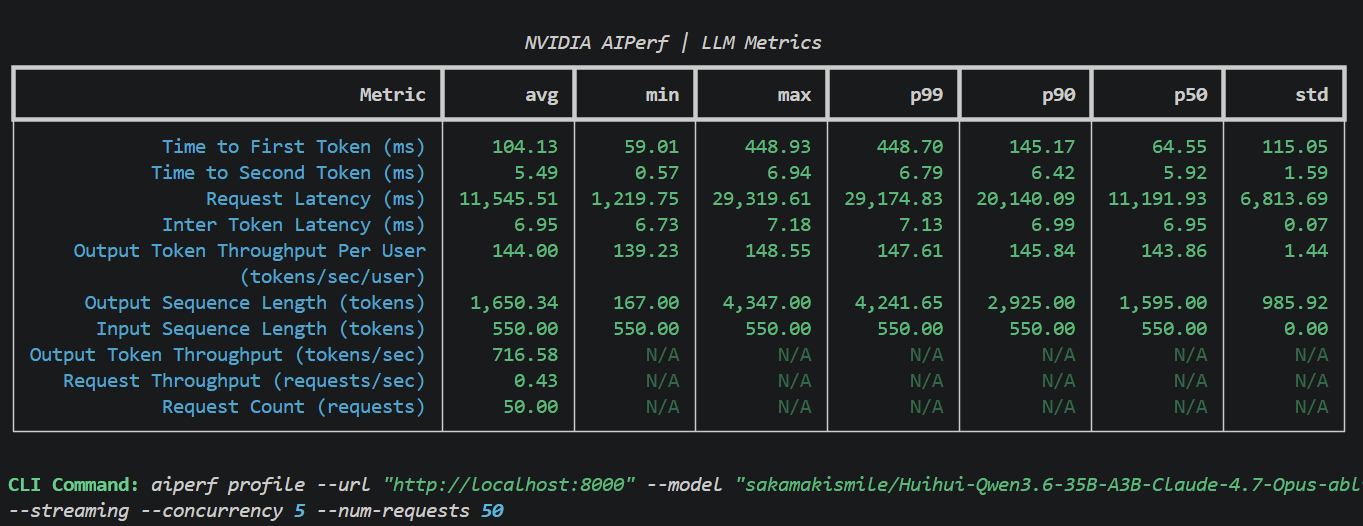
0.89 only allows for a KV cache of 566k tokens, which is a maximum of 4.32x requests, but LM code harness swarms are guaranteed to have extensive shared caching (initial system prompts, etc). The odds of all 5 requesting unique 131k contexts are very low.
Qwen 3.6 A3B Hive
450+ TPS across three 262k windows on this one. Most hive use cases are slightly above this model’s weight class so I didn’t spend much time optimizing this one.
cd docs/chapter-09 && ./run.sh start:hive-only
# Tail logs
cd docs/chapter-09 && ./run.sh logs
# Inference AND indexing. The only way you'll have the VRAM for this is if you implemented
# the previous chapter and your only video output is from the motherboard's thunderbolt.
cd docs/chapter-09 && ./run.sh start:hive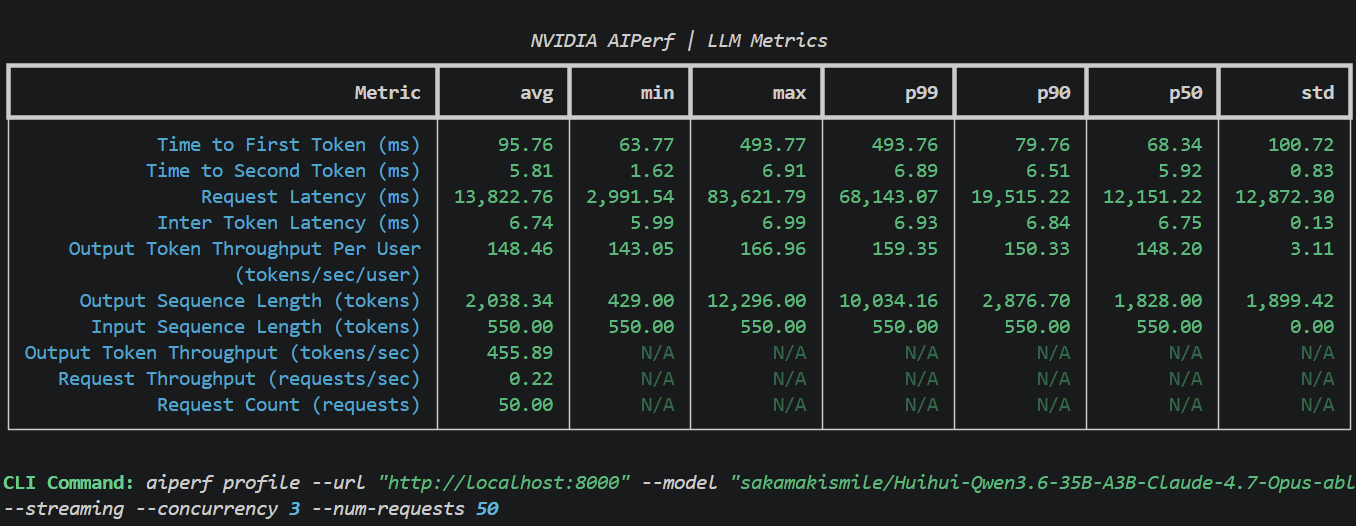
0.93 only allows for a KV cache of 723k tokens, which is a maximum of 2.76x requests, but LM code harness hives where 1 hub drives >3 spokes while thread-swapping with one tend to have even higher shared cache guarantees than most swarm topologies.
Qwen 3.6 A3B Assistant
185+ TPS with 90ms TTFT single request. Use this if you downloaded the prerequisites above, went back to 2023 in your time machine, and wiped your memory of the future.
# Not recommended unless you're bringing your own code indexing!
cd docs/chapter-09 && ./run.sh start:assistant-only
# Tail logs
cd docs/chapter-09 && ./run.sh logs
# You have enough VRAM for this and then some! I recommend this one.
cd docs/chapter-09 && ./run.sh start:assistant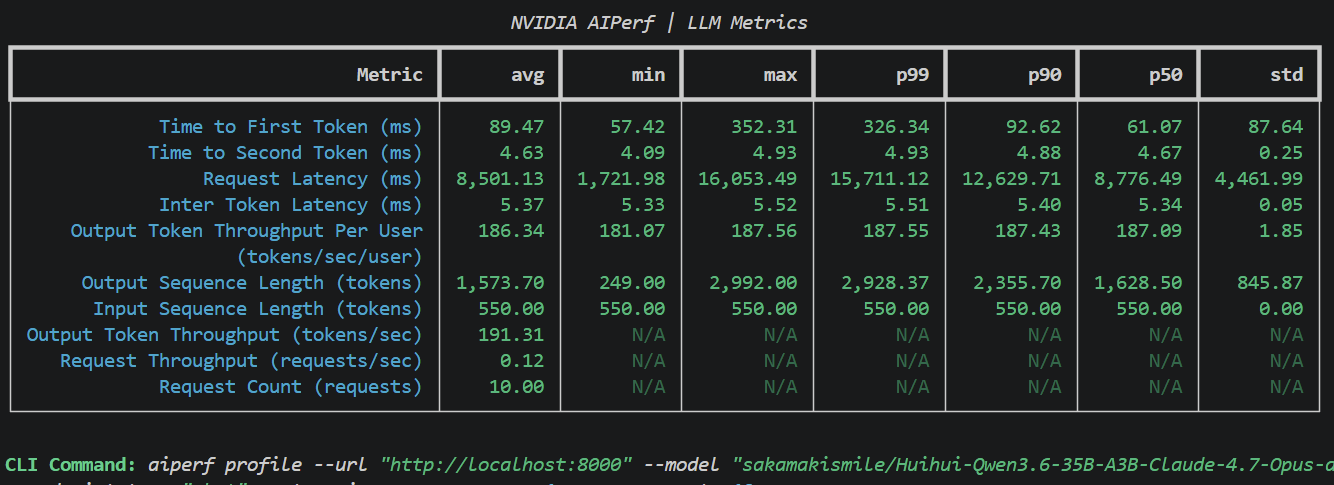
Up Next (still)
We’ll be covering the following for a specific (your own) codebase:
Step outside and touch grass. Yes, for your codebase.
Lay the groundwork for profiling and evals.
Evals for a direct model-vs-model comparison.
Evals for coding harness comparisons.
The delta between, and interaction of, key metrics on #2 and #3.
Understand why optimizing for #2 often hurts #3 and how to fix it.
Define target performance metrics and improve a harness to reach them.

I don’t know why you’re still scrolling but if you’re this lonely:
Refer to item #1 in “Up Next (still)”.
Use your time machine better.
Last resort:
./run.sh chat