
Dev From Scratch: null/n
A detour from the series

This article is a spinoff from the Dev From Scratch series Chapter 6 and Chapter 7, focused on Windows (not WSL) codebase indexing for the Core i9 285H / Arc 140T.
We’ll pick OpenVINO GenAI over Ollama, dIPEX, and TEI due to native NPUW support and OVMS, making it the easy shared memory profile choice for INT8 and INT4 PTQ.
Environment
Git. If you don’t have it:
winget install --id Git.Git -e --source wingetPython. If
python --versiondoesn’t work, you don’t have it, get it here (3.14).VSC. PS:
winget install Microsoft.VisualStudioCode --source wingetDocker.
winget install -e --id Docker.DockerDesktop --source wingetLaunch the “Docker Desktop” app, sign in (or skip) to enable CLI, and reboot.
HuggingFace CLI.
pip install -U huggingface_hubandhf version.And install OVMS into the \ovms folder using these instructions.
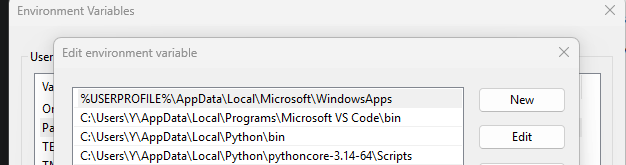
If hf version doesn’t work, you’ll need to add python to your path:
# In PowerShell
python -c "import os, sys; print(os.path.join(os.path.dirname(sys.executable), 'Scripts'))"
Next, press the Windows key and type in “env”:
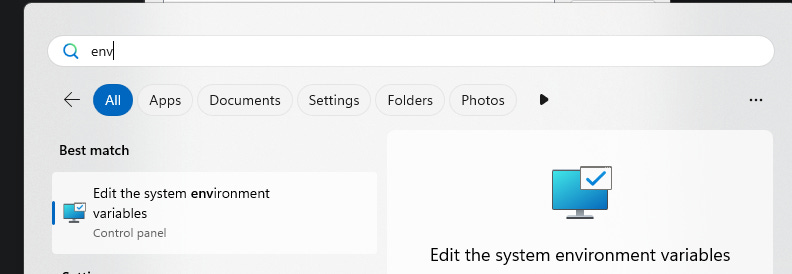
Go to “Environment Variables” button at the bottom, double-click on “Path”. Add the output of that python script by clicking “New” - when done, it should look like this:
# If "hf version" still doesn't work, refresh your PowerShell path with this:
$env:Path = [System.Environment]::GetEnvironmentVariable("Path", "Machine") + ";" + [System.Environment]::GetEnvironmentVariable("Path", "User")
Next up, hf auth login . If you don’t have one, you can make one for free!
NPU
# Create a Python virtual environment
python -m venv .venv

# Activate your environment (if successful, you'll see "(.venv)" at the start of your PS prompt
.\.venv\Scripts\activate

# If you're getting MDM errors on a work machine, you can try:
Set-ExecutionPolicy RemoteSigned -Scope CurrentUser

# Install optimum-cli (this might take a while)
pip install optimum[openvino]

# Confirm device availability. You should see: ['CPU', 'GPU']
python -c "import openvino as ov; print(ov.Core().available_devices)"

# If you don't see 'NPU', check for the npu plugin
Get-ChildItem -Path .\.venv -Filter "openvino_intel_npu_plugin.dll" -Recurse -ErrorAction SilentlyContinue
If you have it, make sure your NPU driver version is 32.0.100.4552+:
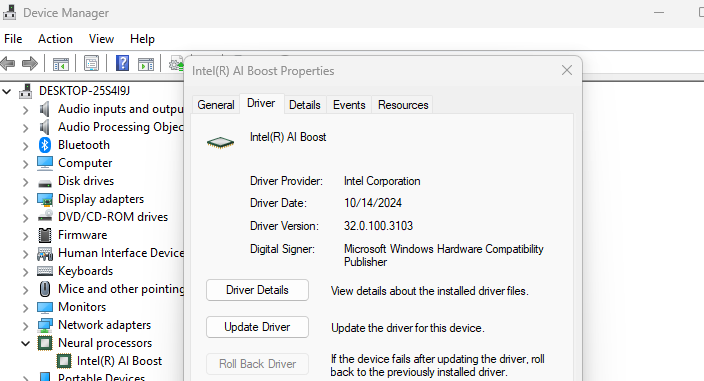
If it’s not, update it, also update your MVC++ to latest, and reboot. Back to PowerShell:
# Remember to re-activate your environment
.\.venv\Scripts\activate

# This should now show "['CPU', 'GPU', 'NPU']". If it doesn't, your machine is MDM locked.
python -c "import openvino as ov; print(ov.Core().available_devices)"

# Confirm INT8 acceleration. This should contain FP16 and INT8
python -c "import openvino as ov; print(ov.Core().get_property('NPU', 'OPTIMIZATION_CAPABILITIES'))"
Embedding Model
# Download embedding model
hf download cstr/F2LLM-v2-0.6B-ONNX-INT8 model.int8.onnx model.int8.onnx.data config.json tokenizer.json tokenizer_config.json special_tokens_map.json --local-dir .\cstr-onnx\

# Convert it
cd cstr-onnx
ovc model.int8.onnx --output_model openvino_model.xml

# Verify shape
python -c "import openvino as ov; m=ov.Core().read_model('openvino_model.xml'); print('INPUTS:', [(i.get_any_name(), i.get_partial_shape()) for i in m.inputs]); print('OUTPUTS:', [(o.get_any_name(), o.get_partial_shape()) for o in m.outputs])"

# The above should say:
# INPUTS: [('input_ids', <PartialShape: [?,?]>), ('attention_mask', <PartialShape: [?,?]>)]
# OUTPUTS: [('last_hidden_state', <PartialShape: [?,?,1024]>)]

# Verify Compilation
python -c "import openvino as ov, numpy as np; c=ov.Core(); m=c.read_model('openvino_model.xml'); m.reshape({'input_ids':[1,512],'attention_mask':[1,512]}); print('compiling NPU...'); comp=c.compile_model(m,'NPU'); out=comp({'input_ids':np.ones((1,512),np.int64),'attention_mask':np.ones((1,512),np.int64)}); v=list(out.values())[0]; print('NPU OK shape',v.shape,'has_nan',bool(np.isnan(v).any()),'std',float(v.std()))"

# The above should, after 30-90 seconds, say something like:
# compiling NPU...
# NPU OK shape (1, 512, 1024) has_nan False std 3.6101675033569336

# Reshape it to 1,512 for NPU memory constraints
python -c "import openvino as ov; core = ov.Core(); model = core.read_model('openvino_model.xml'); model.reshape({'input_ids': [1, 512], 'attention_mask': [1, 512]}); ov.save_model(model, 'openvino_model_static.xml'); print('Static IR saved')"

cd ..

# Create OVMS model serving structure
New-Item -ItemType Directory -Path ".\embedding-npu\1" -Force
Copy-Item .\cstr-onnx\openvino_model_static.xml ".\embedding-npu\1\openvino_model.xml"
Copy-Item .\cstr-onnx\openvino_model_static.bin ".\embedding-npu\1\openvino_model.bin"
Copy-Item .\cstr-onnx\config.json ".\embedding-npu\1\"
Copy-Item .\cstr-onnx\tokenizer*.json ".\embedding-npu\1\"
Copy-Item .\cstr-onnx\special_tokens_map.json ".\embedding-npu\1\"
Create a ovms_config_npu.json file with these contents:
{
    "model_config_list": [
        {
            "config": {
                "name": "embedding-npu",
                "base_path": ".\\embedding-npu",
                "target_device": "NPU",
                "shape": {
                    "input_ids": "(1, 512)",
                    "attention_mask": "(1, 512)"
                }
            }
        }
    ]
}
Run it!
.\ovms\ovms.exe --port 9000 --rest_port 8000 --config_path .\ovms_config_npu.jsonCompatibility Proxy
Most LM code harnesses expect an OAI-compatible proxy, so let’s write one. This specific model expects last-token pooling so we’ll need to implement that as well:
import os
from typing import List, Union

import numpy as np
import requests
import uvicorn
from fastapi import FastAPI, HTTPException
from pydantic import BaseModel
from transformers import AutoTokenizer

OVMS_URL = os.getenv("OVMS_NPU_URL", "http://localhost:8000/v2/models/embedding-npu/infer")
MODEL_DIR = os.getenv("MODEL_DIR", "embedding-npu/1")
SEQ_LEN = 512

tokenizer = AutoTokenizer.from_pretrained(MODEL_DIR)
app = FastAPI()

class EmbeddingRequest(BaseModel):
    input: Union[str, List[str]]
    model: str = "embedding-npu"

def embed(text: str) -> tuple[list[float], int]:
    enc = tokenizer(text, padding="max_length", truncation=True, max_length=SEQ_LEN, return_tensors="np")
    ids, mask = enc["input_ids"].astype(np.int64), enc["attention_mask"].astype(np.int64)
    n = int(mask.sum())

    payload = {"inputs": [
        {"name": name, "shape": [1, SEQ_LEN], "datatype": "INT64", "data": arr.flatten().tolist()}
        for name, arr in (("input_ids", ids), ("attention_mask", mask))
    ]}
    try:
        resp = requests.post(OVMS_URL, json=payload, timeout=30)
        resp.raise_for_status()
    except requests.RequestException as e:
        raise HTTPException(503, f"OVMS failed: {e}")

    hidden = np.asarray(resp.json()["outputs"][0]["data"], np.float32).reshape(SEQ_LEN, 1024)
    vec = hidden[n - 1]
    norm = np.linalg.norm(vec)
    if not norm or np.isnan(vec).any():
        raise HTTPException(500, "Invalid embedding")
    return (vec / norm).tolist(), n

@app.post("/v1/embeddings")
async def embeddings(req: EmbeddingRequest):
    texts = [req.input] if isinstance(req.input, str) else req.input
    if not texts:
        raise HTTPException(400, "No input")
    results = [embed(t) for t in texts]
    total = sum(n for _, n in results)
    return {
        "object": "list",
        "model": req.model,
        "data": [{"object": "embedding", "index": i, "embedding": v} for i, (v, _) in enumerate(results)],
        "usage": {"prompt_tokens": total, "total_tokens": total},
    }

@app.get("/health")
async def health():
    return {"status": "ok"}

if __name__ == "__main__":
    uvicorn.run(app, host="0.0.0.0", port=8080)
Run it!
# Install prerequisites
pip install uvicorn fastapi

# Start the proxy
python proxy.py
Vector DB
We’ll go with Qdrant, nice and simple:
# Create folder for it
New-Item -ItemType Directory -Path “.\qdrant” -Force

# Download Qdrant
curl.exe -L https://github.com/qdrant/qdrant/releases/latest/download/qdrant-x86_64-pc-windows-msvc.zip -o qdrant\qdrant.zip

# Unzip it
cd qdrant
tar -xf qdrant.zip
rm qdrant.zip

# Run it!
.\qdrant.exe
Game On
Now pull down your favorite LM harness and use these settings (any API key):
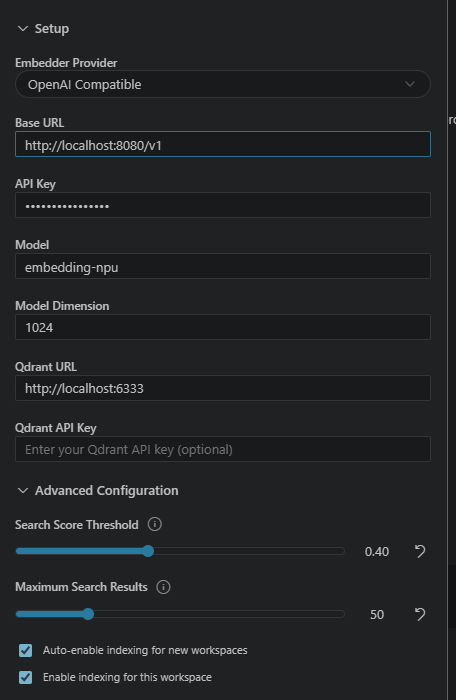
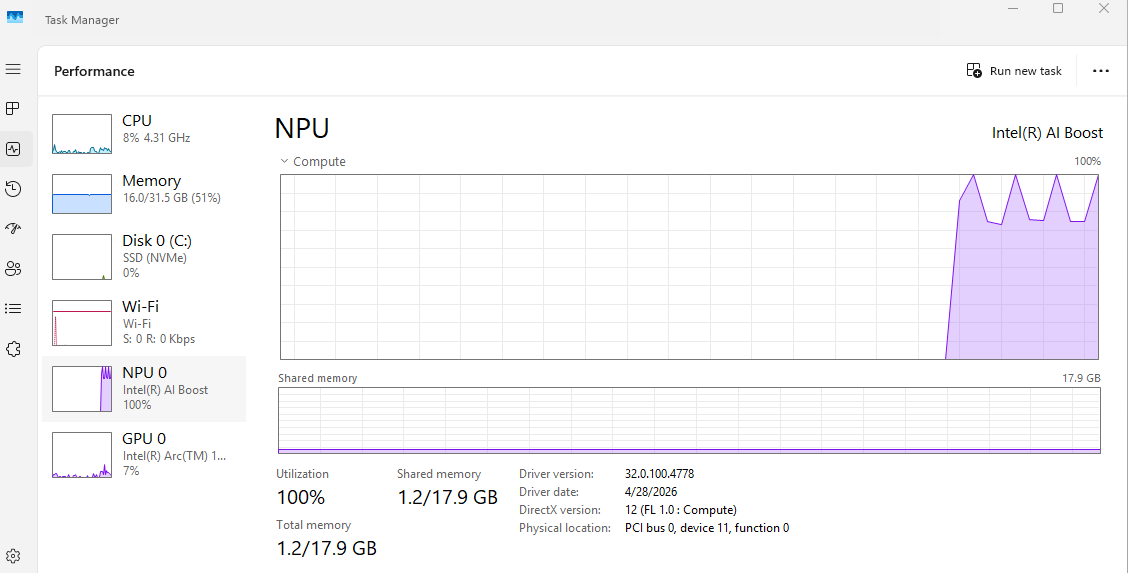
Start indexing and you should see something like this:
Next Up
This is slow. But it’s a working POC! To make this faster, we will:
Add batching of 4-16 and update proxy for it
Add dual-path sequencing for 256 + 512 tokens and update proxy for it.
Maybe just go with a smaller model, lmfao
Try this on the GPU, along with a reranker.